I originally developed this system for my own server. I considered selling it at first, but after seeing the prices in the market I decided that sharing it freely with the community would be the better choice.
I later noticed a similar system being sold on another website. The Hunting Mission System shared here has no connection with that product. It was coded from scratch and tested in different scenarios as carefully as possible before release.
As with any system, there may still be a logic issue or a missing detail that escaped attention. Developers using the system can report problems and suggestions through Discord. Suitable improvements may be considered for later updates.
How Does the System Work?
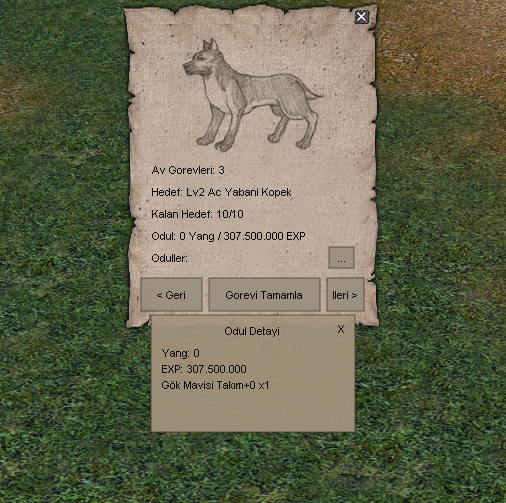
The player opens the Hunting Mission window through the quest notification on the left side of the screen. The mission window runs on the root and Python side, while the actual mission validation is handled by the Game SRC. The interface displays progress, but the server decides whether the mission and its reward conditions are valid.
When the player kills the required monster, progress is stored in the SQL database. The current kill count is preserved after logout or a server restart. Mission completion and reward state are also recorded after the reward is claimed.
Main Features
- The mission window is implemented on the root/Python side.
- Mission validation is handled by the Game SRC.
- Monster kill progress is stored in SQL.
- A completed mission reward cannot be claimed twice.
- A rewarded mission closes and disappears from the list.
- The player continues with the next mission.
- Missions are configured through locale/turkey/hunting_mission.txt.
- Yang, EXP and item rewards are supported.
- Class-specific item, armor and weapon rewards are supported.
- EXP_PERCENT rewards are supported.
- The window opens from the left-side quest notification.
Editing Missions Without Rebuilding the Game Source
Keeping the mission list in locale/turkey/hunting_mission.txt makes content adjustments easier. Target monsters, required kill counts and reward data can be prepared through this structure. Balance changes therefore do not require a new Game SRC modification every time.
This is particularly useful for PvP servers with different progression rates. Mission counts and rewards can be adjusted for hard, medium or easier server concepts.
Persistent Progress and One-Time Rewards
Server-side mission validation and SQL storage are two of the most important parts of the system. A value displayed by the client does not grant a reward by itself. The server checks the target and completion state before delivering anything.
After the reward is claimed, the mission closes and no longer appears in the list. A second reward request for the same mission is prevented, and the player continues with the next objective.
Reward Options
The system supports fixed Yang, EXP and item rewards. EXP_PERCENT can be used to prepare percentage-based experience rewards suitable for the character's current progression.
Different items, weapons or armor can also be assigned according to character class. Warriors, Ninjas, Suras and Shamans completing the same mission can therefore receive rewards appropriate to their own class.
Demonstration Video and Download
The test video included in this article shows the mission window, monster kill progress and reward flow. The installation package and VirusTotal report are available from the Download and VirusTotal buttons on this page.
Before installing the files, compare the changes with your own source structure, create a database backup and perform the first installation on a test server.
Feedback
This system is shared free of charge. If you find a logic issue, a missing detail or a method that could work better, you can send feedback through Discord. Useful reports can help create a cleaner version for everyone using the system.
Enjoy.
Fast support on Discord 🔥
Message us directly for orders, compatibility checks or custom development requests.